Understanding Metadata in Images: What You Need to Know
Explore the different types of metadata embedded in images and how they are used in photography and digital media.

The Hidden DNA of Images: Unlocking Metadata Secrets
Every digital image contains a hidden layer of information called metadata - essentially its digital fingerprint. This invisible code shapes how we interact with visual content, from smartphone snapshots to professional photography. Consider these fascinating facts:
- The average smartphone photo contains 50+ metadata points
- Metadata can account for up to 15% of an image file’s size
- Forensic investigators use metadata to solve crimes (like tracking John McAfee through geotagged photos)
- Apple once accidentally leaked confidential comments in image metadata
Let’s decode this invisible infrastructure that powers our visual world.
The Three Core Metadata Types Explained
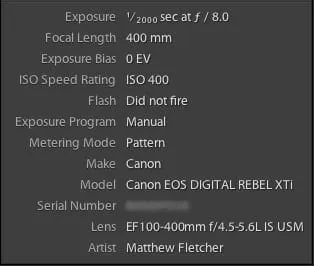
1. EXIF (Exchangeable Image File Format): The Camera’s Diary
What it captures:
- Camera model, lens, aperture, shutter speed, ISO
- GPS coordinates (if enabled)
- Date/time of capture
- Unique camera serial number
Cool fact: Your smartphone secretly records how long you held the shutter button! Long-exposure shots store exact duration in EXIF data.
Real-world impact: When National Geographic photographers analyze their best shots, they study EXIF data to recreate perfect lighting conditions.
2. IPTC (International Press Telecommunications Council): The Content Librarian
Key components:
- Copyright and creator details
- Captions and keywords
- Source information and job IDs
Industry secret: Associated Press transmits over 500,000 photos daily with embedded IPTC captions that automatically populate news systems.
Example: Getty Images photos contain 15+ IPTC fields that power their search engine and licensing system.
3. XMP (Extensible Metadata Platform): The Digital Time Machine
Advanced capabilities:
- Stores Photoshop edit history (every brush stroke!)
- Preserves Lightroom development settings
- Embeds AI generation prompts in synthetic media
Fascinating use: Forensic analysts use XMP data to detect image manipulation in legal cases.
Why Metadata Matters Beyond the Pixel
For Photographers
- Learning tool: Analyze exposure settings from your best shots
- Workflow efficiency: Filter images by lens or focal length
- Proof of ownership: Embedded copyright survives cropping/resizing
- Geotagging: Wildlife photographers relocate rare species using GPS coordinates
For Content Creators
- Organization: Search “blue sky beach” across 20,000 images
- Automation: Generate alt-text from descriptions
- Rights management: License expiration alerts
- Case study: Travel blogger reduced image search time by 70% through systematic keyword tagging
For Legal Protection
- Copyright evidence: Courts accept metadata as proof of ownership
- Authentication: Verifies unaltered originals via cryptographic hashes
- Licensing compliance: Stores usage restrictions within files
Privacy Risks: The Hidden Danger
Metadata can accidentally reveal:
- Home addresses through geotagged photos
- Device identification via serial numbers
- Embarrassing timestamps (like photos taken during work hours)
- Editing history showing original versions of “retouched” images
Protect yourself: Always scrub metadata from sensitive images using tools like ImageOptim before sharing.
Tools for Metadata Mastery
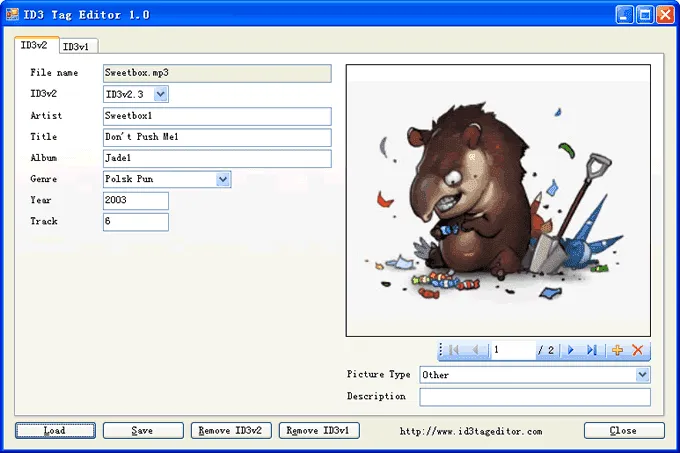
Viewing Tools
- Windows: Right-click → Properties → Details
- Mac: Preview → Tools → Show Inspector
- Online: Pixduplicate.com (instant visual analysis)
- Professional: Adobe Bridge, Photo Mechanic
Editing Solutions
| Tool | Best For | Special Feature |
|---|---|---|
| ExifTool | Batch processing | Command-line power |
| Adobe Lightroom | Photographers | Preset templates |
| PhotoME | Deep analysis | HEX data viewing |
| XnViewMP | Beginners | Cross-platform |
Pro Tip:
Use Pixduplicate.com to quickly verify metadata before sharing images publicly - it reveals hidden data that even some professionals overlook!
The Future of Image Metadata
- AI Auto-Tagging: Adobe Sensei automatically tags “beach” or “mountain” scenes
- Blockchain Verification: TrueProfile certifies unaltered images for news organizations
- 3D Spatial Data: Next-gen cameras embed depth maps in metadata
- Emotion Recognition: Experimental systems tag perceived emotions in photos
Key Takeaways
- Metadata = Digital DNA: It contains more information than the visible image
- Privacy First: Always audit sensitive images (use Pixduplicate.com for quick checks)
- Preserve Your Rights: Embed copyright in EXIF/IPTC fields
- Organize Smartly: Descriptive keywords are future-proof search fuel
- Validation Power: Courts accept metadata as evidence
Pro Tip: Create Lightroom presets that automatically embed your copyright and contact info - never lose credit for your work again!

